
How-To, Part 15: Radio Broadcasting
Building WDAR Dead Air Radio From a Home Studio
By EmmittOwens.com Staff
Radio doesn’t have to begin with a broadcast tower, a corporate studio, or a room full of expensive equipment. Sometimes it starts with a computer, a microphone, a few old recordings, a strange idea, and somebody saying: “We’re on the air.”
That’s essentially how WDAR Dead Air Radio came together — my own experimental broadcasting project, where music, old recordings, homemade commercials, fictional programming, and lo-fi production all live in the same world. This installment of the How-To series walks through how I build it, using tools anyone can access from a bedroom or spare room.
What Is WDAR Dead Air Radio?
WDAR is a fictionalized, DIY radio station built around prerecorded programming and an intentionally rough, vintage-inspired sound. The goal isn’t to imitate modern commercial radio — it’s closer to the opposite. Commercial radio is polished, compressed, and tightly controlled. WDAR is allowed some dirt under its fingernails: odd advertisements, strange characters, long pauses, and the texture of something you might find on a forgotten cassette.
WDAR isn’t just a folder of audio files. It’s a world.
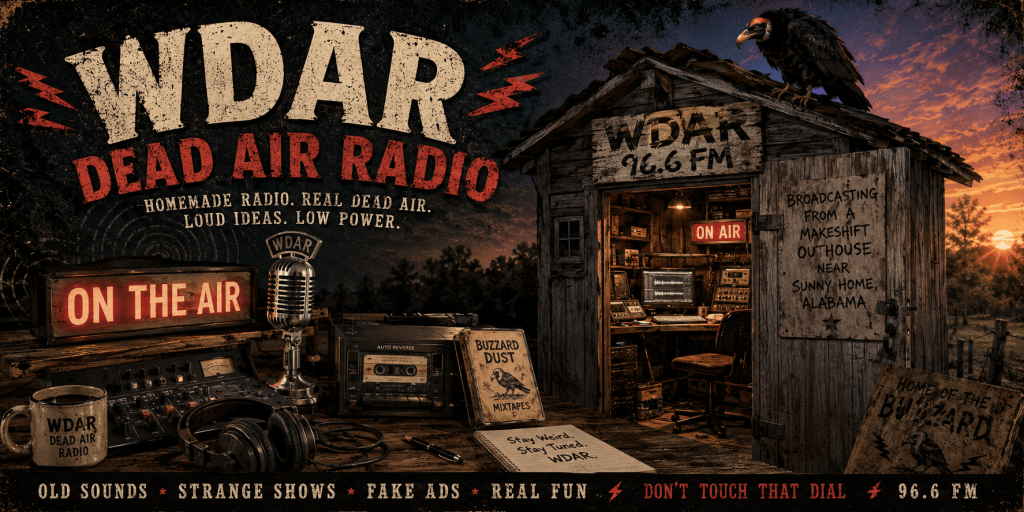
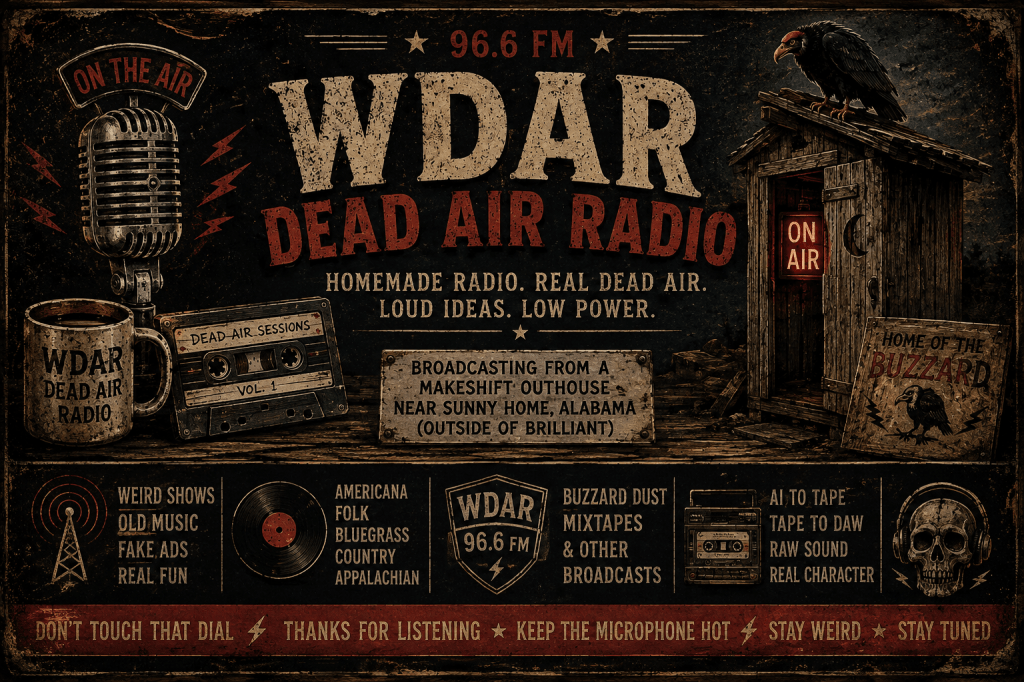
There really is a makeshift outhouse near Sunny Home with a fake buzzard on it, and you’re using that as the physical identity/location of WDAR — while the actual radio programming is produced at home —
It’s an intentionally absurd piece of radio mythology, but it’s also part of what makes WDAR what it is. There’s no glass tower, no polished studio lobby, no corporate branding on the building — just a homemade setup, an old-school approach to audio, and a buzzard watching over the whole operation. It fits the station perfectly: WDAR isn’t meant to look like a radio station. It’s meant to look like something you’d notice behind somebody’s property in rural Alabama and wonder about for the next twenty years.
The fictional headquarters and the real-world production process have become intertwined. The music, commercials, station IDs, and lo-fi programming are all created and assembled as a genuinely homegrown project, while the outhouse near Sunny Home gives WDAR a physical identity of its own — down to a fake buzzard convincing enough to make someone slow down and stare.
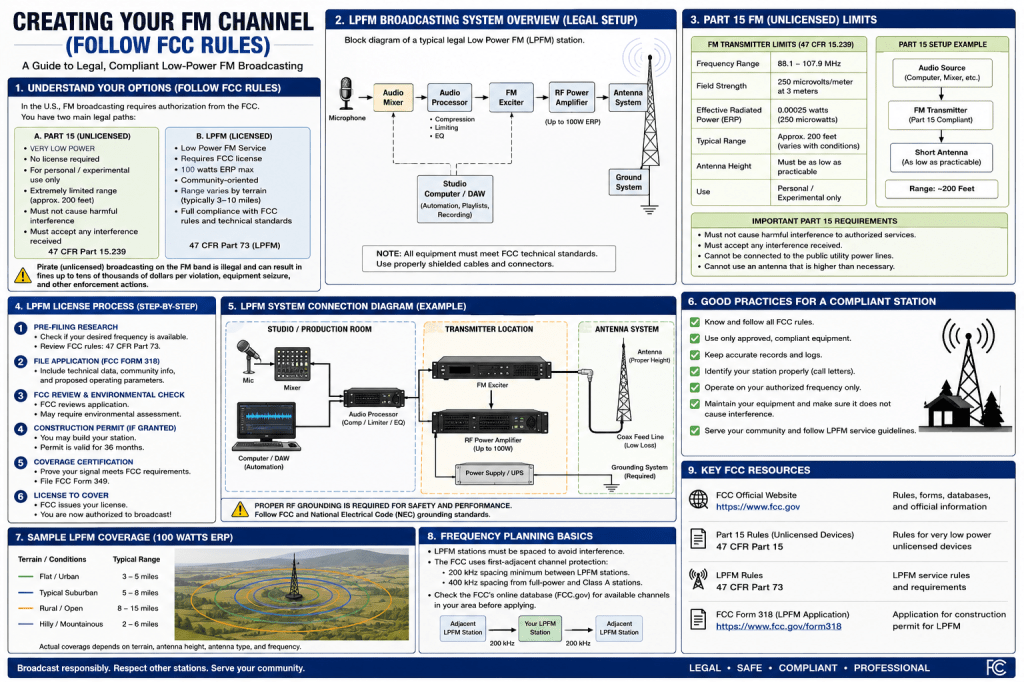
From an outhouse to the airwaves. It’s worth drawing a clear line here between the WDAR production studio and any actual radio-frequency transmission. Making radio programming is one thing; transmitting an FM signal is another. Programming can be created, edited, mixed, and archived entirely within the studio — but if an FM transmitter is ever involved, its use has to comply with the applicable FCC rules and authorization requirements (see Section 11 for specifics on Part 15 and licensed low-power operation).
That’s why the technical side of WDAR gets taken as seriously as the creative side. The goal isn’t simply owning a transmitter — it’s understanding what’s legally permitted to transmit, what technical limits apply, how interference is handled, and where the line falls between a home audio project and an actual over-the-air radio service. Treating a fictional station broadcasting from an Alabama outhouse with real technical seriousness is part of the experiment. The buzzard can be fake. The FCC rules aren’t.
1. Start With the Station, Not the Equipment
The most common mistake for anyone getting into broadcasting is thinking about gear before thinking about identity. Don’t start with “What microphone should I buy?” Start with “What kind of station am I building?”
For WDAR, the answer is simple: weird, homemade, nostalgic, lo-fi, entertaining. Once that’s settled, the equipment and production choices get much easier. Give the station a name, a call sign, a slogan, recurring programs, recurring characters, station IDs, jingles, and commercials — and you already have the bones of a station.
2. Build a Small Home Studio
A professional broadcast studio isn’t necessary. A basic setup covers most of what you need:
- A computer
- A microphone
- Headphones
- An audio interface or mixer
- Studio monitors or reference headphones
- A DAW (digital audio workstation) or audio editor
- Storage for your audio files
Your computer becomes the production room, your microphone becomes the announcer’s booth, your DAW becomes the editing desk, and everything else is up to your imagination. Years of working with DAW software have taught me that you can build a full production environment without ever setting foot in a traditional station.
3. Learn Your DAW’s Core Workflow
You don’t need to master every feature of your software — just the ones you’ll actually use for radio work: recording, editing, fading, leveling, processing, and exporting. That short list of skills is enough to start assembling complete programs.
4. Create the WDAR Station ID
Every station needs an identity: “You’re listening to WDAR Dead Air Radio.” That single line establishes the station — but don’t stop at one version. Record several: short, long, serious, absurd, late-night, distorted, vintage-sounding. Scatter them through your programming. Repetition is what turns a sound into branding — listeners start recognizing it as a signal that they’re inside the WDAR world, not just hearing another audio clip.
5. Build the Programming
This is where the Buzzard Dust Mixtapes fit naturally into WDAR. A mixtape becomes a program. A stack of old recordings becomes an “archival” broadcast. A comedy bit becomes a recurring segment. A fake news broadcast becomes a station feature. Because this is a DIY, fictional station, you aren’t waiting on a programming director’s approval — you are the programming director.
6. Write and Produce Your Own Commercials
Invented advertisers are one of the most fun parts of building a fictional station: a barber shop, a questionable medical tonic, a tire shop, a business with an absurd name. Write the spot, record the announcer, add music and sound effects, process it, and drop it between two songs. A single commercial break does more to sell the illusion of a “real” broadcast than almost anything else in the mix.
7. Give the Station a Consistent Sound
A clean, modern digital recording doesn’t automatically sound like an old broadcast. If you’re chasing a lo-fi or vintage aesthetic, useful tools include EQ, compression, saturation, distortion, tape simulation, vinyl noise, hiss, wow-and-flutter, room ambience, and reverb.
The trick is restraint: apply processing consistently rather than piling every effect onto every clip. A touch of hiss can make something feel old. A little distortion can make a voice sound like it came through a worn transmitter. The goal isn’t to make something sound bad — it’s to make it sound like it came from somewhere.
8. Let Dead Air Do Some Work
The name says it all. In prerecorded, creative radio, silence is a production tool, not a failure — a pause before a voice comes in can build tension, a “dead” mic can become a running joke, a few extra seconds of nothing can make a segment feel stranger than any sound effect would. (On an actual live broadcast, excessive dead air is a real problem for real reasons — but WDAR isn’t live, so silence is fair game.)
9. Create Recurring Characters
A station feels alive when it has people in it — even fictional ones. Build a small cast: a DJ who sounds professional, one who sounds half-asleep, a caller who shows up too often, a reporter who’s clearly making it up as they go. Contrast between voices is what creates comedy and a sense that WDAR is run by a cast, not one person alone at a computer.
10. Fill In the Familiar Radio Elements
News, weather, sports, traffic, community announcements, PSAs, jingles — all the pieces of traditional radio are fair game, and since this is fiction, none of them have to be accurate or even plausible. That’s part of the fun.
11. Internet Broadcasting vs. Over-the-Air Broadcasting
This distinction matters, and it’s worth getting right. Producing radio programming and transmitting an actual radio-frequency signal are legally and technically separate activities. WDAR is a production project — everything above can be recorded, mixed, and distributed online without ever touching a transmitter.
If you do want to experiment with actual RF transmission in the United States, know that the FCC treats it seriously. Broadcasting on the AM or FM bands generally requires a license. There is a narrow exception under Part 15 of the FCC’s rules (47 CFR Part 15) for extremely low-power, unlicensed transmitters — but the limits are strict: FM devices under Part 15.239 and AM devices under Part 15.207/15.209/15.219/15.221 are restricted to an effective range of roughly 200 feet, and any interference they cause to licensed stations must be tolerated, not the reverse. Operating outside those limits without a license is unlicensed (“pirate”) broadcasting, and the FCC can pursue enforcement action, with penalties currently running up to tens of thousands of dollars per violation. If low-power FM licensing interests you long-term, the FCC’s actual LPFM (Low Power FM) service is the legal path to a small licensed station — but that’s a separate, formal process, not something you back into with a Part 15 device.
None of this affects WDAR as described here. For most home creators, internet-based distribution remains the simplest and legally simplest way to get programming in front of an audience.
If you want to experiment with actual over-the-air broadcasting in the United States, research the FCC rules that apply to the specific type of transmitter and service you’re considering. Internet broadcasting and RF transmission are different things, and operating outside the applicable authorization or technical limits can result in enforcement action.
12. Assemble a Full Program
Once the pieces exist, put them together. A simple structure:WDAR DEAD AIR RADIO Station ID Music DJ introduction Music Commercial Music News segment Station ID Music Comedy segment Commercial Music DJ outro Station ID END OF PROGRAM
Record each piece separately, assemble it in your DAW, and export the finished cut. Then just listen — all the way through, without editing as you go. Does it feel like a station? Does the pacing hold up? Are there enough IDs? Do the commercials land? Most importantly: would you actually want to listen to this?
13. My Actual WDAR Production Workflow
This is where the theory turns into an actual broadcast.
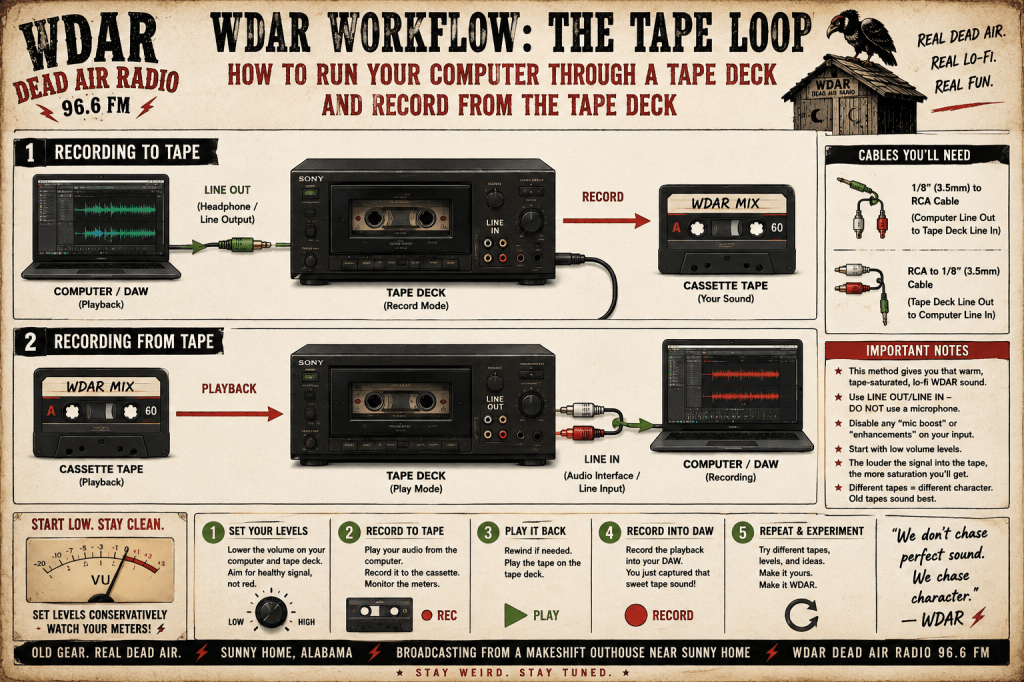
My workflow usually starts with an idea rather than a technical plan — a song, a character, a joke, an advertisement, an old recording, or just a hunch about a strange segment. From there, I record or create the individual pieces, bring them into the DAW, edit them, level them, add processing and sound effects where needed, and assemble everything into a finished program.
The important part is that I don’t treat every recording as a one-off project. I’m building a library of material that gets reused and rearranged. A station ID recorded today might show up in a program six months from now. A commercial might resurface in a different broadcast. A character might return in a completely different show. That’s how a pile of individual recordings starts behaving like a station.
14. Radio Imaging: The Sounds Between the Sounds
One of the easiest ways to make a homemade project feel like a real station is to pay attention to imaging — the connective tissue between programming. That includes station IDs, jingles, sweepers, bumpers, stingers, show intros and outros, promos, transition effects, and voice-over announcements.
You might only hear one of these for five seconds, but those five seconds do a lot of work establishing identity. For WDAR, imaging doesn’t need to sound polished or corporate — it can be strange, primitive, funny, distorted, or deliberately outdated. What matters is consistency: if listeners hear the same sonic language throughout the programming, they start recognizing it immediately.
15. Build an Audio Library
Once you start producing regularly, the biggest problem isn’t making audio — it’s finding the audio you already made. Organize as you go:WDAR DEAD AIR RADIO │ ├── Station IDs ├── Jingles ├── Sweepers ├── Commercials ├── News ├── Weather ├── DJ Segments ├── Characters ├── Sound Effects ├── Music ├── Shows └── Archives
A consistent naming system pays off too:WDAR_ID_01.wav WDAR_ID_02.wav WDAR_COMMERCIAL_BUZZARD_DUST_01.wav WDAR_NEWS_2026_08_31.wav WDAR_JINGLE_03.wav
It seems unnecessary with twenty files. It becomes essential with two thousand. Organization is one of those unglamorous parts of production that eventually saves you hours.
16. Make Recordings Sound Like They Were Found
One of the things I enjoy most about WDAR and the Buzzard Dust Mixtapes is the idea that a recording doesn’t have to sound like it was made yesterday — it can sound like somebody found it.
That’s a different way of approaching lo-fi production. Instead of asking “how do I make this sound old?”, try asking “what would this sound like if somebody discovered it on an old tape twenty or forty years from now?” That reframing changes the decisions you make: maybe there’s tape hiss, a limited frequency range, some background noise, imperfect balance, a little distortion, a rough edge at the start or end. The goal isn’t to randomly degrade a file — it’s to create the impression that the recording has a history.
17. Keep Your Programming in a Consistent World
A station becomes more convincing when its individual pieces feel like they belong together — the same station IDs, the same general production style, recurring characters, recurring advertisers, recurring jokes, recurring programs.
Small details help too. A fictional business mentioned in one commercial might resurface months later. A DJ might reference something from another program. A character might call into a different show. A strange advertisement might turn up during an unrelated broadcast. These small connections make the station feel larger than any single recording.
18. Don’t Try to Build Everything at Once
You don’t need six hours of programming before you can call yourself a broadcaster. Start with five minutes: a short intro, a song, a station ID, a thirty-second commercial, another song, an outro. That’s a broadcast. Then make another one.
Five-minute pieces become ten-minute programs. Ten-minute programs become thirty-minute shows. Thirty-minute shows become an archive. That’s how a project like WDAR actually grows — not by building the whole station up front, but one piece at a time, until you look around and realize you’ve built a station.
19. What I Would Do Differently Today
If I were starting WDAR from scratch today, I wouldn’t begin by chasing the perfect equipment — I’d begin by making something. Equipment matters, but knowing how to use what you already have matters more. Someone with a basic microphone who understands recording, editing, mixing, and storytelling can produce something far more interesting than someone with thousands of dollars of gear and nothing to say.
Start with the tools you have. Learn them. Experiment. Make mistakes. Save the good stuff. Improve. That’s how you end up with a sound that actually belongs to you.
20. Music, Samples, and Copyright
There’s another side of broadcasting worth understanding before distributing anything publicly: rights and licensing. Music, recordings, samples, sound effects, photographs, and other creative material can all be protected by copyright — availability on the internet doesn’t mean it’s free to use in a public broadcast.
You’re in a much safer position if you’re working with original material, properly licensed content, material you have explicit permission to use, or material that’s genuinely in the public domain. The rules get complicated quickly, especially once a broadcast reaches a commercial or large audience. When in doubt, find out who owns something and what permission is required before it goes into the mix. DIY radio offers enormous creative freedom, but that freedom holds up best when you know what’s yours and what isn’t.
21. The Difference Between Making Radio and Being a Radio Station
This distinction is worth repeating. You can make complete radio programs — write a show, record a DJ, produce commercials, build station IDs and jingles, mix an hour of programming, and publish it online — without ever operating a transmitter. That’s radio production.
Operating an actual over-the-air station is a separate technical and regulatory matter involving transmitters, frequencies, and a different set of legal responsibilities (see Section 11). The first can happen entirely in a bedroom. The second can’t. For WDAR, production is the point — the station exists because the programming exists.
22. Build the Archive
Don’t throw anything away. Keep original recordings, old versions, alternate mixes, the strange stuff, the failed commercials, the unused station IDs, the recordings that don’t quite work. You never know when an old piece of audio becomes useful again.
More importantly, an archive gives the station a history. Years from now, you can hear how the sound changed. The old recordings, the mistakes, and the primitive early experiments all become part of the story — eventually, the archive itself becomes another form of broadcasting.
23. The Point Isn’t Perfection
Modern digital tools tempt you to fix everything — the noise, the timing, the pitch, the volume, the mistake, the transition. Sometimes that’s exactly right. Sometimes it isn’t.
For a project like WDAR, imperfection can be part of the personality. A slightly crooked transition can feel more human. A strange pause can become funny. A little noise can give a recording character. A homemade commercial can be more memorable than a professionally produced one. The goal was never technical perfection — it’s making something interesting enough that somebody wants to keep listening.
24. Start Your Own Station
You don’t have to copy WDAR. That’s probably the most important lesson here. Build a station around whatever interests you — old music, local history, comedy, horror, talk radio, cars, sports, folk music, strange stories, anything. Give it a name and an identity, make some station IDs, record a program, listen to it, and make another one.
You might start out thinking you’re just making a few recordings. Six months later, you may have a station. A year later, you may have an archive. Eventually, you may have built something that sounds like it has always existed. That’s the real appeal of DIY broadcasting — you aren’t just making audio, you’re creating a place for that audio to live.
The Sound I Never Expected to Choose
With additional reporting from EmmittOwens.com staff
There’s another part of WDAR worth explaining: the music.
Old Americana, folk, bluegrass, country, and Appalachian music became the station’s musical soul — and that wasn’t the obvious choice. Before 2014, this genre wasn’t remotely on the radar. But somewhere along the way, these old recordings started offering something that wasn’t turning up anywhere else: a kind of nostalgia, not for a specific year or place, but for a feeling.
Early Appalachian recordings, primitive string bands, pre-war country, and mountain music often sound like they arrived from another world. A banjo, a fiddle, an acoustic guitar, and a voice captured through primitive equipment can build an atmosphere that modern production spends enormous effort trying to fake — and there’s something genuinely fascinating about music that sounds like it could have been recorded in a room in the 1920s, because in a lot of cases, that’s exactly what it is.
Why this genre? Partly because it isn’t crowded. Contemporary pop, electronic music, hip-hop, rock, and every other modern genre already have no shortage of outlets — and there’s nothing wrong with any of it. But WDAR was meant to occupy a different corner of the radio universe: a place where an old Appalachian ballad can sit next to a primitive bluegrass recording, followed by a homemade commercial, followed by a strange fictional announcement — something that feels like it shouldn’t quite exist in 2026.
From the blanket fort to the broadcast booth. A modern home studio can be almost anything — a bedroom, a closet, a basement, or something closer to a blanket fort with a microphone in it — and most of today’s bedroom-production culture naturally leans toward modern sounds. That makes sense. But WDAR’s setup runs in the opposite direction: instead of using a modern computer to make a recording sound bigger, cleaner, and newer, the goal is often to make it sound smaller, older, and more human. The listener should hear the room. The limitations should stay audible. The banjo should sound like someone actually sat down and played it — with a little dust still on the recording.
A radio station with an old soul. That’s the clearest way to describe it: a modern project with an old soul. The computer, the DAW, the plugins, and the distribution are all modern — the feeling being chased is much older, and that contradiction is the point. Modern technology is being used here to create something that feels like it’s been sitting in an old station’s archive for decades. That combination — WDAR, the Buzzard Dust Mixtapes, old Americana, Appalachian music, folk, bluegrass, and lo-fi production — works because it doesn’t try to hide that it’s homemade. Being homemade is the identity.
The Buzzard Dust Connection
The Buzzard Dust Mixtapes work as a case study for why this kind of DIY broadcasting is worth doing: the music doesn’t have to exist in isolation. A recording can sound like an old broadcast, a fictional DJ can introduce it, a strange commercial can follow it, and suddenly you’ve built a small piece of imaginary radio history. After years of working with DAWs and plugins, that’s still the part I find most interesting — using modern digital tools to make something sound like it’s been sitting on a dusty shelf for forty years.
You Don’t Need a Radio Station Building
That’s the core lesson here. No tower, no corporate studio, no staff, no six-figure console — just an idea, some basic equipment, the willingness to learn recording and editing, and something worth putting behind the microphone. WDAR started as an idea. The Buzzard Dust Mixtapes, the commercials, the characters, and the general weirdness all became part of it, and eventually those pieces started behaving like a real station.
Final Thought
Radio is ultimately about imagination. A microphone can turn a bedroom into a studio. A DAW can turn a computer into a production room. A station ID can turn an audio file into a broadcast. And a little imagination can turn the whole thing into a world.
That’s WDAR Dead Air Radio: not the biggest station, not trying to sound like corporate broadcasting — just a homemade corner of the radio universe. Sometimes it’s music. Sometimes it’s comedy. Sometimes it’s Buzzard Dust. And sometimes, there’s nothing but dead air.
Keep the microphone hot. Keep the imagination running. And whatever you do — don’t touch that dial.


Leave a Reply