
The Windows XP Advantage:
Why FruityLoops 2 and 3 Can Be a Powerful Front End
…for AI Music
Written by: emmittowens.com staff / September 26th 2026
FruityLoops 2 and 3 won’t make AI music sound better by magic. What they can do is give the AI a source you designed yourself, built from a sonic vocabulary that modern software no longer hands you by default.
One of the more counterintuitive ideas in modern production is this: the way to make AI-generated music sound less generic may be to feed it something genuinely old. Not an expensive modern synthesizer, another AI generator, or a $500 plugin emulating analog gear, but a Windows XP computer running FruityLoops 2 or 3.
Both versions come from a different era. FruityLoops 2 arrived in 1999 and FruityLoops 3 in 2001, and the program was renamed FL Studio with version 4 in 2003. Neither was written for XP: a contemporary review of version 3.1 listed Windows 95, 98, ME and 2000 as supported systems, with a Pentium II/200 and 32 MB of RAM as the minimum. Running them on XP is a practical choice, not a historical one.
The result is not better audio in any modern technical sense. It is audio produced through a different chain of decisions. That difference becomes creatively valuable when the rendered WAV is used as the starting point for an AI system such as Suno.
FruityLoops 2 and 3 are different instruments: version 3 added the Piano Roll, synth-plugin hosting and per-pattern automation that version 2 did not have. The FruityLoops 3 manual spells this out in a dedicated section for 2.x users.
The program began with Didier Dambrin, a young Image-Line developer drawn to Hammerhead and ReBirth 338, who merged ideas from both into a MIDI-only step sequencer. According to Image-Line’s company history, the demo released in December 1997 was downloaded so heavily that it overwhelmed the company’s servers. The official launch followed in early 1998, and version 2 arrived in 1999.
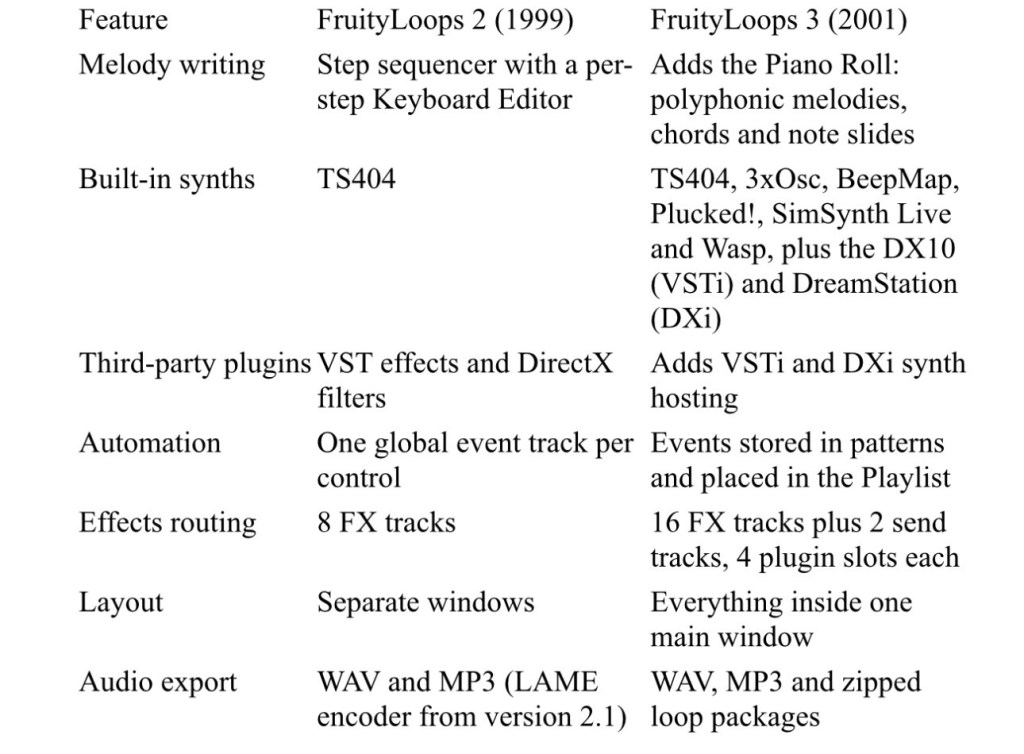
FruityLoops 2 is the more constrained of the two. FruityLoops 3 is already a small workstation, though a contemporary review still flagged its single level of undo and its inability to render channels as separate tracks.
Limitation, not capability, is what makes these versions useful. Modern software is built around near-infinite flexibility: thousands of synthesizers, vast sample libraries, and tools that quantize, pitch-correct and polish a performance until it is almost unnaturally perfect.
Neither FruityLoops 2 nor 3 offers anything like that range, and both push you to commit early. You pick a sound, program a pattern, shape the parameters available, arrange the patterns, process them and render. The FruityLoops 3 manual describes the Step Sequencer simply: each channel holds one sound, and 16 dots mark the sixteenth notes of a bar. Patterns could be stretched from 4 to 64 steps, but the grid remained the starting point.
The hardware of the era shaped the feel too. The manual notes that a fast computer and good sound card might reach about 10 ms of latency, while a SoundBlaster Live would likely manage around 30 ms. Playing in real time meant negotiating with the machine.
On an XP desktop running one of these versions, there are no endless browser tabs, no sample libraries measured in gigabytes and no hundred-track template. There is the computer, the program, your sounds and an idea. A fixed setup, one operating system, one program version, one set of instruments and effects, creates repeatable limitations, and repeatable limitations can become a signature.
The TS404: the link between both versions
The TS404 is the one synthesizer both versions share, and it proves an old install can generate real synthesized material rather than just replay samples. Version 2 changelogs already refine it: 2.1 improved its distortion when rendering and let the random tool generate TS404 notes and slides, and 2.71 fixed a bug in its starting note.
The FruityLoops 3 manual describes it as a bass-line synth that sounds similar to the Roland TB-303. It documents two oscillators with a mix control, an envelope, an LFO that can modulate cutoff, resonance, tuning and pulse width, switchable filters, distortion, delay and pitch bending. One quirk: a single delay line is shared by every TS404 channel in a project. The manual’s credits name Richard Hoffmann as the author of both the TS404 and Wasp engines.
Its lineage is documented. In DJ Mag’s history of FL Studio, Plastician recalls Skream and Benga showing him how to use the TS404 for warping, wobbly bass lines, and calls it the defining dubstep bass sound of roughly 2002 to 2005. The TS404 has since been deprecated in modern FL Studio, which is one more reason the old versions remain the place to use it.
Fact versus producer mythology
The honest case for this workflow is stronger than the myths that surround it. Three claims deserve correcting.
Myth one: XP adds analog warmth. It does not. Windows XP is not a tape machine, an old computer does not make digital audio warmer, and the TS404 is not a physical TB-303. What differs is the processing. In FruityLoops 3, each sample channel carries its own distortion, reverb, stereo delay, a crude sine-wave effect, cutoff and resonance, before any mixer effects are added. Those processes become part of the rendered signal. The old software gives you a different digital signal, not an analog one.
Myth two: the step sequencer has a special “unquantized crunch.” Nothing in the documentation supports built-in looseness, but the sequencer is not rigidly locked either. The FruityLoops 3 Graph Editor includes a per-step Shift control alongside volume, pan, pitch, cutoff and resonance. In version 2.1, Image-Line set the default resolution to 96 PPQ, moved shift and delay values to 192 PPQ accuracy, and redesigned the humanize box. Off-grid feel exists, but it is a deliberate setting, not an accident of old code. Version 3’s Piano Roll adds per-note velocity, pan, cutoff and resonance.
Myth three: “uncompressed MIDI purity.” MIDI is not audio. It is performance and control data: play C3 here, at this velocity, change this controller. A synthesizer turns those instructions into sound. The FruityLoops 3 manual distinguishes WAV, a raw format at roughly 10 MB per minute, from compressed MP3 at roughly 1 MB per minute. The accurate description is cleanly rendered digital audio from an old production environment.
That is also why WAV matters here. If the result is heading into another audio system, WAV preserves the render instead of passing it through lossy compression first. One caveat: the review of 3.1 notes that the entry-level Pro edition was limited to 16-bit, 44.1 kHz audio.
Don’t hand the AI a blank page
The real technique is giving the AI a musical seed instead of a prompt alone. Suno’s Audio Upload lets you record or add an audio file from the Create page as the starting point for a new piece. Its help centre says Pro and Premier subscribers can upload up to eight minutes, enough for a full song rather than a fragment.
That changes the creative relationship. Instead of prompt → AI invents everything, the chain becomes human → FruityLoops 2 or 3 → WAV → AI → new interpretation. You have already established something: a rhythm, a chord progression, a bass movement, a strange synth line, a melodic fragment, a texture or a deliberately imperfect arrangement.
Picture a sparse Appalachian progression built in FruityLoops from an old synth, a sampled instrument, simple step programming, odd note lengths and one crude effect. Uploading that WAV is not the same as typing “make me an Appalachian song.” It says: here is my musical idea, interpret it. The AI stops being the composer and becomes another instrument in the chain.
The goal is not to convince the AI you own vintage gear. It is to make your input genuinely different. A generic modern piano progression gives the model familiar ground; a progression shaped by an old synth, an unusual rhythm and deliberate arrangement gives it an individual one. Whether the output is better is a creative judgment, but the process is unquestionably different.
Documented as a repeatable technique, the process breaks into seven steps.
Build the musical skeleton. Start with what you actually want to contribute: a chord progression, bass line, melody, rhythm, drone, synth texture or odd sound effect. Don’t try to finish the song. Create the identity seed. Choose FruityLoops 2 for the tighter sample-and-step workflow, or 3 when you need the Piano Roll for chords.
Use the old instruments deliberately. In version 2 that means samples and the TS404. Version 3 adds 3xOsc, Wasp, SimSynth Live, BeepMap and Plucked!. The TS404 suits anything that should sound obviously electronic and period-specific. Don’t clean everything up; much of the character comes from committing to decisions.
Push the effects hard. Version 2 gives you 8 FX tracks; version 3 gives you 16 plus two sends, each holding four plugins. The FruityLoops 3 manual compares the plugin chain to guitar stomp boxes: order changes the result. Try filter → distortion → delay, or TS404 → distortion → delay.
Export to WAV. Both versions render WAV and MP3 from the File menu. Choose WAV so you don’t add lossy compression before the AI stage. In version 3, automation lives inside patterns, so render in Song mode to capture every recorded knob movement.
Upload the audio to Suno. Use only material you made or have rights to. Audio Upload then treats your sound as the starting point, reversing the usual order: your idea first, the AI’s interpretation second.
Don’t settle for the first generation. Generate variations and listen for melodic changes, unexpected harmonies, new instrumentation, rhythmic reinterpretations, vocal ideas and sections that genuinely improve on your original.
Bring the result back into your DAW. Cut, arrange, EQ, layer and mute. Add your original FruityLoops material back underneath, record something new over it, or run it through tape.
The full chain runs: FruityLoops instruments and samples → FruityLoops effects and arrangement → WAV render → Suno Audio Upload → AI interpretation → your DAW → final production. At that point, the AI is one stage in a larger, human-directed process.
Adding physical hardware turns “AI music” into a genuine production process. Run the rendered audio out to an old cassette deck and back, and the chain becomes: Windows XP → FruityLoops 2 or 3 → WAV → AI → DAW → cassette → cassette playback → DAW.
Every stage leaves fingerprints. They are not necessarily fingerprints an AI detector could reliably identify, but they are audible characteristics produced by a real chain of transformations, some digital and some physical.
The part AI didn’t create: authorship in the FruityLoops workflow
If you use AI to finish a track, the most important thing you created may have happened before you opened the AI. The key question is where the human-authored part of the song begins. For a producer on an XP machine, it often begins with a small FruityLoops 2 or 3 project: a drum pattern, a bass line, a melody, or a strange sequence made at two in the morning because it sounded good.
Render that to WAV and upload it, and the AI may add instrumentation, vocals, harmonies and whole new sections. The AI generated part of the finished recording. That does not make your contribution disappear, which is why the original FruityLoops work matters more than most producers realize.
A pattern is a set of decisions
Sixteen steps and a few notes can look insignificant, but each records a choice: which notes exist, when they happen, which sounds play them, the tempo, what repeats and what changes. Add velocity, automation, effects and arrangement, and the project file becomes a record of your decisions.
That matters because U.S. copyright protection arises automatically when an original work is fixed in a tangible form for the first time; registration is not required for protection. The Copyright Office notes that sounds can be fixed in a digital track, disk or tape. This does not mean every four-bar pattern is protected. It means creating and fixing original musical expression is fundamentally different from describing an idea to an AI.
“Make a dark song with a repeating bass line” is an instruction. So is “use a four-chord progression at 120 BPM.” Both are ideas, and ideas are not protected. Programming a specific original melody, rhythm or arrangement in FruityLoops moves you from describing an idea to expressing one.
The Copyright Office treats musical works as including original compositions and original arrangements or new versions that add copyrightable authorship. There is no magic number of notes. Brevity and simplicity count against protection: the Office says short recordings may lack enough authorship, just as short phrases do, and a generic beat or common chord progression carries little protectable expression on its own. A larger original work can still be protected even when built from ordinary building blocks.
So the useful question is not “did I make a pattern?” It is: what original musical expression did I create, and how much of it survives in the finished work?
Composition and recording are separate works
U.S. law treats a musical composition and a sound recording as two different works. The composition is the music itself (melody, rhythm and harmony) plus any lyrics, authored by composers and lyricists. The sound recording is a particular fixation of sounds, authored by performers, producers or engineers. Copyright in one is not a substitute for copyright in the other.
A FruityLoops workflow creates several layers. The melody and bass line you program are compositional material. Your WAV render is a recording of them. The AI output is another recording, and your edit, overdubs and final mix are further layers. “I made the song with AI” says little. “I wrote the underlying material, used AI to transform and expand it, then edited and produced the result” describes an actual creative process.
What the Copyright Office says about AI
On January 29, 2025, the U.S. Copyright Office published Part 2 of its report on copyright and AI. It concluded that purely AI-generated material is not protected and that prompts alone do not make a user the author. It also said human authorship can be protected in the creative selection, arrangement or modification of AI output, and that the Office would register AI-assisted output where minimally creative human-authored inputs remain perceptible in the result.
That position rules out both extremes: AI does not mean you own nothing, and a prompt does not mean you own everything. Consider two producers. Producer A types a prompt describing an eerie Appalachian industrial song, and the AI generates everything. Producer B spends three hours in FruityLoops 3 building a bass movement, a rhythm, a melody and an unusual progression, renders it and uploads it for the AI to build around.
Their finished songs might sound nothing alike, but their creative histories differ fundamentally. Producer B has a pre-AI artifact: a project file, a WAV and a documented chain of decisions. That does not give Producer B every element the AI added, but it provides something a prompt cannot: a human-created musical starting point that can be heard in the result.
Commercial rights are not copyright
A platform can let you commercially use its output without that output being protected by copyright. Commercial permission answers what the platform’s terms allow you to do. Copyright answers what original expression is legally protected and who authored it. Suno’s help centre, updated September 3, 2026, says songs downloaded while subscribed to a paid plan carry commercial-use rights, but that those rights do not guarantee copyright, which each country’s copyright office decides. It also says Suno owns songs made on the free plan, while paid subscribers own theirs, and uploads must be material you have rights to use.
The same logic applies to samples, loops and plugins. Permission to use something does not mean you created it.
Your FruityLoops project is a straightforward record of what you did, so keep more than the final MP3. Save the original .flp file, the WAV render, the samples you were licensed to use, screenshots of the arrangement, notes on what you changed, and every version before and after the AI stage. A consistent naming scheme makes the history easy to follow:
Stage
Example file
Original FruityLoops project
Song_01.flp
Original render
Song_01_original.wav
AI input
Song_01_AI_input.wav
AI generation
Song_01_AI_v01.wav
Selected generation
Song_01_AI_selected.wav
Human edit
Song_01_edit.wav
Final production
Song_01_final.wav
Open that folder five years later and you can hear where the song began, what the AI changed and what you changed afterward. That is not just organization. It is a record of authorship and creative development.
Copyright exists on fixation, but registration adds a public record of your claim, and U.S. works generally must be registered before an infringement suit can be filed. For albums, the Copyright Office offers Group Registration for Works on an Album of Music (GRAM). One application covers 2 to 20 musical works from the same album; a separate application covers 2 to 20 sound recordings, plus photographs, artwork or liner notes released with the album. The works must be first published on the same album on the same date, share at least one common author and have the same claimant, and the two groups must be registered separately.
The aim is not to “copyright the loop” as standalone property. It is to preserve and document your contribution to a musical work. The right registration strategy depends on the work and its circumstances.
This section summarizes U.S. copyright principles and published platform policy for general information. It is not legal advice, and rules vary by jurisdiction and by the facts of each work.
Conclusion: expanding the producer’s instrument
Windows XP is not a technological advantage; it is a creative advantage through constraint. The old environment offers different instruments, processing, limitations, workflow, defaults and aesthetic possibilities. Feed that material into a modern generative system and the contrast becomes the point.
It also suggests a shift in how we think about AI music. For several years the dominant question has been what prompt should I give the AI? The more interesting question may bewhat should I create before I give the AI anything? That treats the AI less like a vending machine and more like a musician entering your studio. You create something and hand it over; it interprets; you take the result back, reshape it and hand something else over. The finished recording becomes a conversation between human decisions, old technology and new technology.
FruityLoops 2 and 3 were released into a world of Windows 98 and 2000 PCs, SoundBlaster cards, hardware knob boxes, CD burners and MP3.com. The FruityLoops 3 manual even suggests MP3.com as the place to publish your songs. A quarter-century later, these versions can serve as the front end of a generative workflow neither they nor the AI was designed for. That works not because old software is better, or because AI understands the “soul” of vintage equipment, but because your creative decisions began somewhere most AI music users never start.
A program from 1999 or 2001, a TS404 bass line, a cassette deck, a modern DAW, an AI generator, and a human in the middle deciding what stays and what goes. That is not replacing the producer. It is expanding the producer’s instrument, and perhaps the best reason yet to keep that old XP machine alive.
So create before you generate, and save everything. The most important file in an AI music project might not be the final WAV. It might be the small .flp file at the start of the chain: the part AI didn’t create.
Image-Line, Company History: FruityLoops’ origins and the rename to FL Studio
Wikipedia, FL Studio: 1997 demo, 1998 launch and version 4 rename
Screech House, Evolution of FL Studio: version 2 in 1999, version 3 in 2001
FruityLoops 3 manual (2001, archived copy): changes from 2.x, Step Sequencer, TS404, effects, Piano Roll, export, credits
FruityLoops 2.1 changelog and 2.71 changelog(OldVersion.com): TS404 fixes, LAME MP3, PPQ timing, DirectX and VST support
Electronic Musician, Fruityloops 3.1 review: system requirements, plugin support, editions, limitations
DJ Mag, How FL Studio changed electronic music forever: the TS404 in early dubstep
Image-Line forum, TS404 deprecation thread: TS404 removed from modern FL Studio
Suno, How to Use: Audio Uploads: eight-minute uploads on Pro and Premier
Suno, What rights do I have with a paid subscription? andDo I have the copyrights to songs I made?: commercial use versus copyright
Copyright Alliance, summary of the Copyright Office AI report, Part 2 and ABA SciTech Lawyer: January 2025 findings on prompts and human authorship
U.S. Copyright Office, Circular 56A: musical compositions versus sound recordings
U.S. Copyright Office, Circular 56: fixation of sound recordings and short-work limits
U.S. Copyright Office, Circular 50 (archived): automatic protection on fixation and registration before suit
U.S. Copyright Office, GRAM FAQ and GRAM overview: group registration for albums


Leave a comment